 sebingel
1d4fd09444
sebingel
1d4fd09444
Two independent reliability problems were identified during PR readiness
review. First, FritzConnection had no explicit timeout, meaning an
unreachable or slow Fritz!Box would block the plugin process indefinitely
until the OS TCP timeout fired (typically 2+ minutes), making the 60s
RUN_TIMEOUT in config.json ineffective. Second, hashlib.md5() called
without usedforsecurity=False raises ValueError on FIPS-enforced systems
(common in enterprise Docker hosts), silently breaking the guest WiFi
synthetic device feature for those users.

Changes:
- Add timeout=10 to FritzConnection(...) call (fritzbox.py:57)
  The fritzconnection library accepts a timeout parameter directly in
  __init__; it applies per individual HTTP request to the Fritz!Box,
  bounding each TR-064 call including the initial connection handshake.

- Add usedforsecurity=False to hashlib.md5() call (fritzbox.py:191)
  The MD5 hash is used only for deterministic MAC derivation (not for
  any security purpose), so the flag is semantically correct and lifts
  the FIPS restriction without changing the computed value.

- Update test assertion to include timeout=10 (test_fritzbox.py:307)
  assert_called_once_with checks the exact call signature; the test
  expectation must match the updated production code.

The plugin now fails fast on unreachable Fritz!Box (within 10s per
request) and works correctly on FIPS-enabled hosts. Default behavior
for standard deployments is unchanged.





NetAlertX - Network Visibility & Asset Intelligence Framework


Centralized network visibility and continuous asset discovery.
Monitor devices, detect change, and stay aware across distributed networks.
NetAlertX provides a centralized "Source of Truth" (NSoT) for network infrastructure. Maintain a real-time inventory of every connected device, identify Shadow IT and unauthorized hardware to maintain regulatory compliance, and automate compliance workflows across distributed sites.
NetAlertX is designed to bridge the gap between simple network scanning and complex SIEM tools, providing actionable insights without the overhead.
Table of Contents
Quick Start
Warning
⚠️ Important: The docker-compose has recently changed. Carefully read the Migration guide for detailed instructions.
Start NetAlertX in seconds with Docker:
docker run -d \
  --network=host \
  --restart unless-stopped \
  -v /local_data_dir:/data \
  -v /etc/localtime:/etc/localtime:ro \
  --tmpfs /tmp:uid=20211,gid=20211,mode=1700 \
  -e PORT=20211 \
  -e APP_CONF_OVERRIDE='{"GRAPHQL_PORT":"20214"}' \
  ghcr.io/netalertx/netalertx:latest
Note: Your /local_data_dir should contain a config and db folder.
To deploy a containerized instance directly from the source repository, execute the following BASH sequence:
git clone https://github.com/netalertx/NetAlertX.git
cd NetAlertX
docker compose up --force-recreate --build
# To customize: edit docker-compose.yaml and run that last command again
Need help configuring it? Check the usage guide or full documentation.
For Home Assistant users: Click here to add NetAlertX
For other install methods, check the installation docs
|| Docker guide || Releases || Docs || Plugins || Website
Features
Discovery & Asset Intelligence
Continuous monitoring for unauthorized asset discovery, connection state changes, and IP address management (IPAM) drift. Discovery & scan methods include: arp-scan, Pi-hole - DB import, Pi-hole - DHCP leases import, Generic DHCP leases import, UNIFI controller import, SNMP-enabled router import. Check the Plugins docs for a full list of avaliable plugins.
Notification gateways
Send notifications to more than 80+ services, including Telegram via Apprise, or use native Pushsafer, Pushover, or NTFY publishers.
Integrations and Plugins
Feed your data and device changes into Home Assistant, read API endpoints, or use Webhooks to setup custom automation flows. You can also build your own scanners with the Plugin system in as little as 15 minutes.
Workflows
The workflows module automates IT governance by enforcing device categorization and cleanup policies. Whether you need to assign newly discovered devices to a specific Network Node, auto-group devices from a given vendor, unarchive a device if detected online, or automatically delete devices, this module provides the flexibility to tailor the automations to your needs.
Documentation
Explore all the documentation here or navigate to a specific installation option below.
Supported browsers: Chrome, Firefox
- [Installation] Docker
- [Installation] Home Assistant
- [Installation] Bare metal
- [Installation] Unraid App
- [Setup] Usage and Configuration
- [Development] API docs
- [Development] Custom Plugins
Security & Privacy
NetAlertX scans your local network and can store metadata about connected devices. By default, all data is stored locally. No information is sent to external services unless you explicitly configure notifications or integrations.
Compliance & Hardening:
- Run it behind a reverse proxy with authentication
- Use firewalls to restrict access to the web UI
- Regularly update to the latest version for security patches
- Role-Based Access Control (RBAC) via Reverse Proxy: Integrate with your existing SSO/Identity provider for secure dashboard access.
See Security Best Practices for more details.
FAQ
Q: How do I monitor VLANs or remote subnets?
A: Ensure the container has proper network access (e.g., use --network host on Linux). Also check that your scan method is properly configured in the UI.
Q: What is the recommended deployment for high-availability? A: We recommend deploying via Docker with persistent volume mounts for database integrity and running behind a reverse proxy for secure access.
Q: Will this send any data to the internet? A: No. All scans and data remain local, unless you set up cloud-based notifications.
Q: Can I use this without Docker? A: You can install the application directly on your own hardware by following the bare metal installation guide.
Q: Where is the data stored?
A: In the /data/config and /data/db folders. Back up these folders regularly.
Troubleshooting Tips
- Some scanners (e.g. ARP) may not detect devices on different subnets. See the Remote networks guide for workarounds.
- Wi-Fi-only networks may require alternate scanners for accurate detection.
- Notification throttling may be needed for large networks to prevent spam.
- On some systems, elevated permissions (like
CAP_NET_RAW) may be needed for low-level scanning.
Check the GitHub Issues for the latest bug reports and solutions and consult the official documentation.
Everything else
📧 Get notified what's new
Get notified about a new release, what new functionality you can use and about breaking changes.

🔀 Other Alternative Apps
- Fing - Network scanner app for your Internet security (Commercial, Phone App, Proprietary hardware)
- NetBox - The gold standard for Network Source of Truth (NSoT) and IPAM.
- Zabbix or Nagios - Strong focus on infrastructure monitoring.
- NetAlertX - The streamlined, discovery-focused choice for real-time asset intelligence and noise-free alerting.
💙 Donations
Thank you to everyone who appreciates this tool and donates.
Click for more ways to donate
 |
 |
|---|
- Bitcoin:
1N8tupjeCK12qRVU2XrV17WvKK7LCawyZM - Ethereum:
0x6e2749Cb42F4411bc98501406BdcD82244e3f9C7
📧 Email me at jokob@duck.com if you want to get in touch or if I should add other sponsorship platforms.
🏗 Contributors
This project would be nothing without the amazing work of the community, with special thanks to:
pucherot/Pi.Alert (the original creator of PiAlert), leiweibau: Dark mode (and much more), Macleykun (Help with Dockerfile clean-up), vladaurosh for Alpine re-base help, Final-Hawk (Help with NTFY, styling and other fixes), TeroRERO (Spanish translations), Data-Monkey, (Split-up of the python.py file and more), cvc90 (Spanish translation and various UI work) to name a few. Check out all the amazing contributors.
🌍 Translations
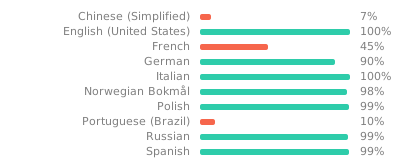
Proudly using Weblate. Help out and suggest languages in the online portal of Weblate.
License
GPL 3.0 | Read more here | Source of the animated GIF (Loading Animation) | Source of the selfhosted Fonts

All product names, logos, and brands are property of their respective owners. All company, product and service names used in this website are for identification purposes only. Use of these names, logos, and brands does not imply endorsement.