
40 KiB
Executable File
📚 Dokumente für einzelne Plugins
🏴 Community-Übersetzungen dieser Datei
 English (American)
 Spanish (Spain)
🔌 Plugins und 📚 Dokumente
| Required | CurrentScan | Unique Prefix | Plugin Type | Link + Docs |
|---|---|---|---|---|
| Yes | ARPSCAN | Script | arp_scan | |
| CSVBCKP | Script | csv_backup | ||
| Yes | DHCPLSS | Script | dhcp_leases | |
| DHCPSRVS | Script | dhcp_servers | ||
| Yes | NEWDEV | Template | newdev_template | |
| NMAP | Script | nmap_scan | ||
| Yes | PIHOLE | External SQLite DB | pihole_scan | |
| SETPWD | Script | set_password | ||
| SNMPDSC | Script | snmp_discovery | ||
| Yes* | UNDIS | Script | undiscoverables | |
| Yes | UNFIMP | Script | unifi_import | |
| WEBMON | Script | website_monitor | ||
| N/A | N/A | SQL query | No beispiel available, but the External SQLite based plugins work very similar |
- Das Undiscoverables-Plugin (
UNDIS) fügt nur vom Benutzer angegebene Dummy-Geräte ein.
Note
Sie können Plugins über die Einstellungen sanft deaktivieren oder Plugins vollständig ignorieren, indem Sie eine „ignore_plugin“-Datei im Plugin-Verzeichnis ablegen. Der Unterschied besteht darin, dass ignorierte Plugins nirgendwo in der Benutzeroberfläche angezeigt werden (Einstellungen, Gerätedetails, Plugins-Seiten). Die App überspringt ignorierte Plugins vollständig. Geräteerkennungs-Plugins fügen Werte in die Datenbanktabelle „CurrentScan“ ein. Die Plugins, die nicht erforderlich sind, können getrost ignoriert werden, es ist jedoch sinnvoll, zumindest einige Plugins zur Geräteerkennung (die Einträge in die Tabelle „CurrentScan“ einfügen) zu aktivieren, wie z. B. ARPSCAN oder PIHOLE.
Es wird empfohlen, für alle Plugins, die für die Erkennung neuer Geräte zuständig sind, das gleiche Zeitplanintervall zu verwenden.
🌟 Erstellen Sie ein benutzerdefiniertes Plugin: Übersicht
 |
 |
 |
|---|---|---|
 |
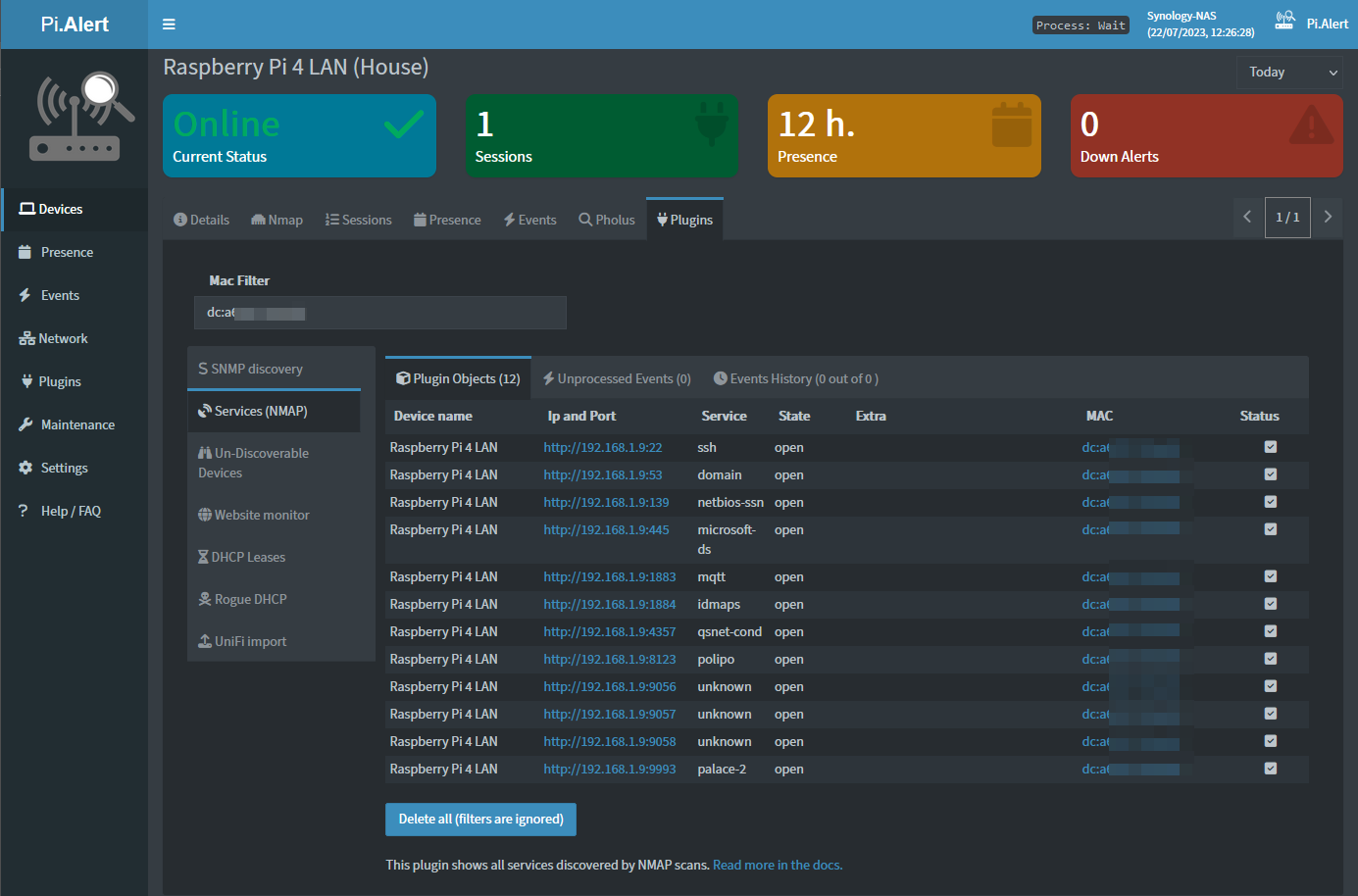 |
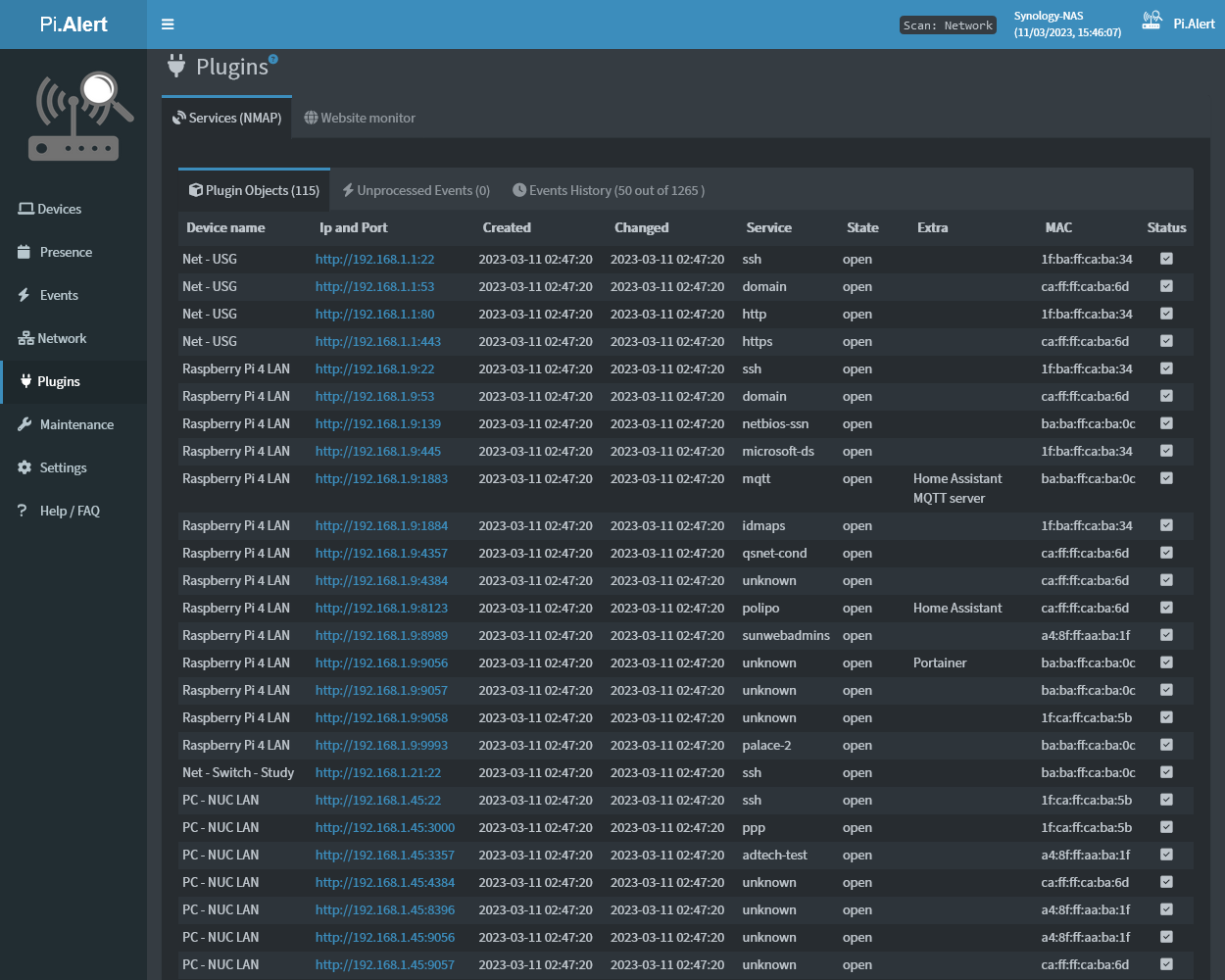
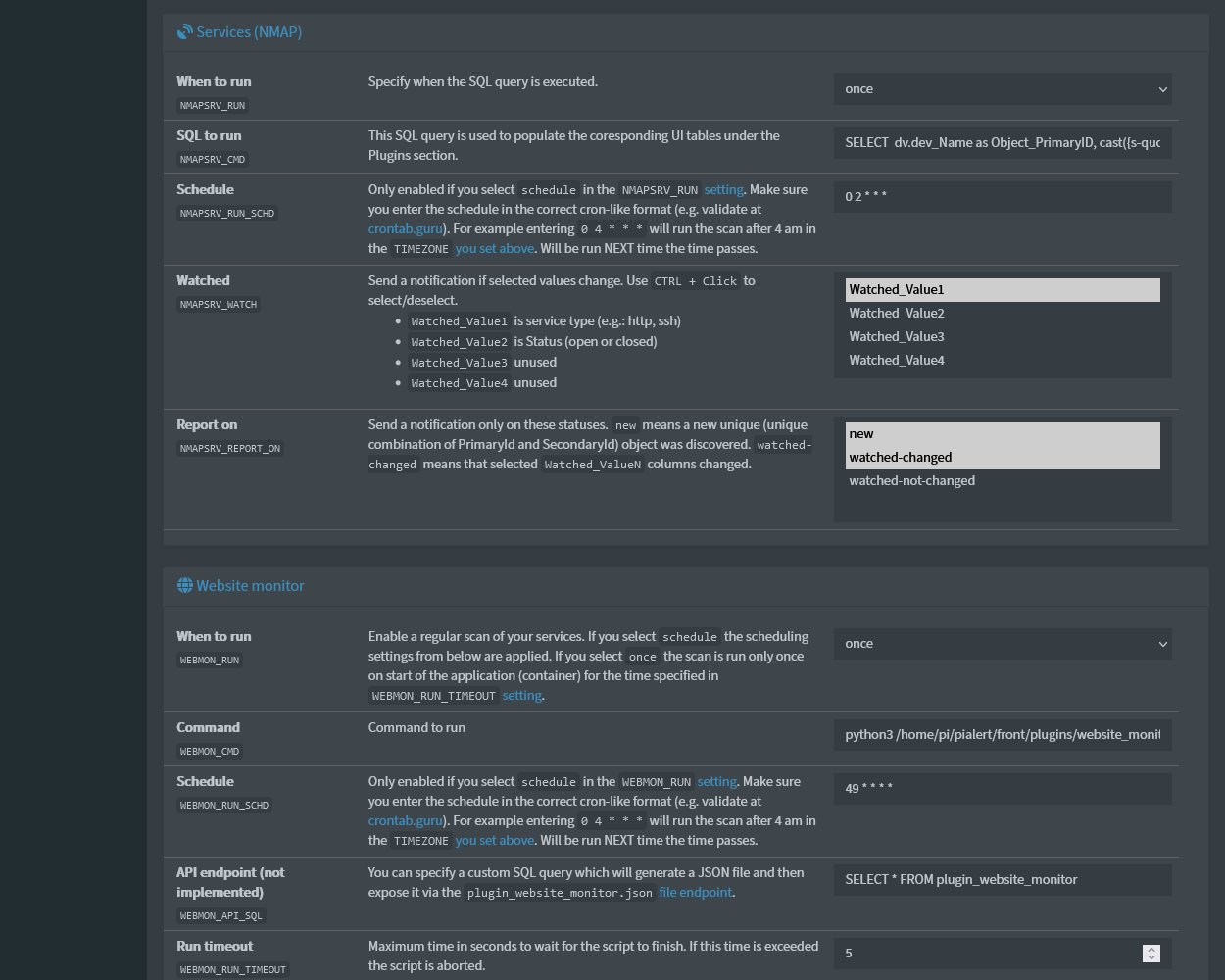
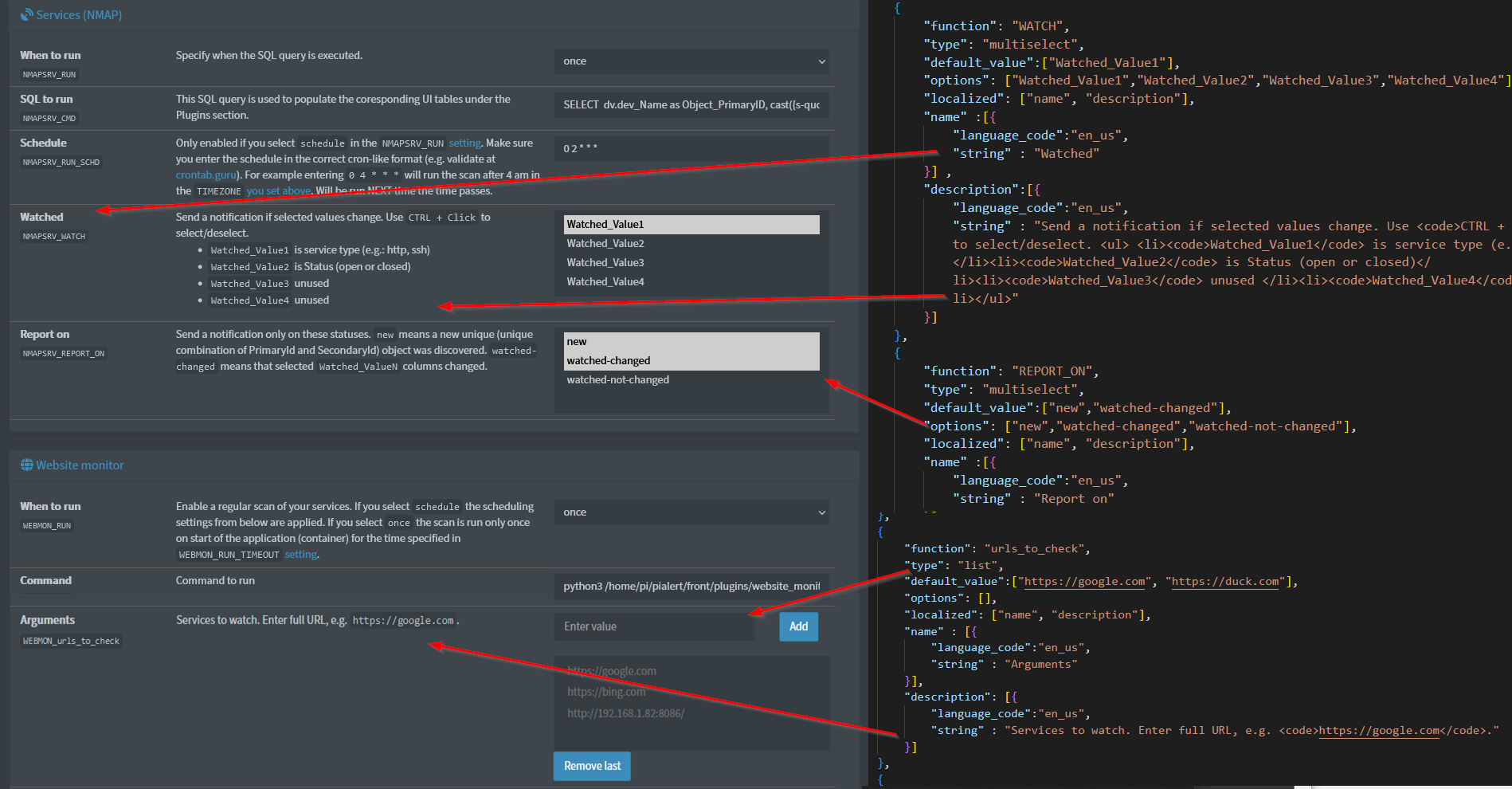
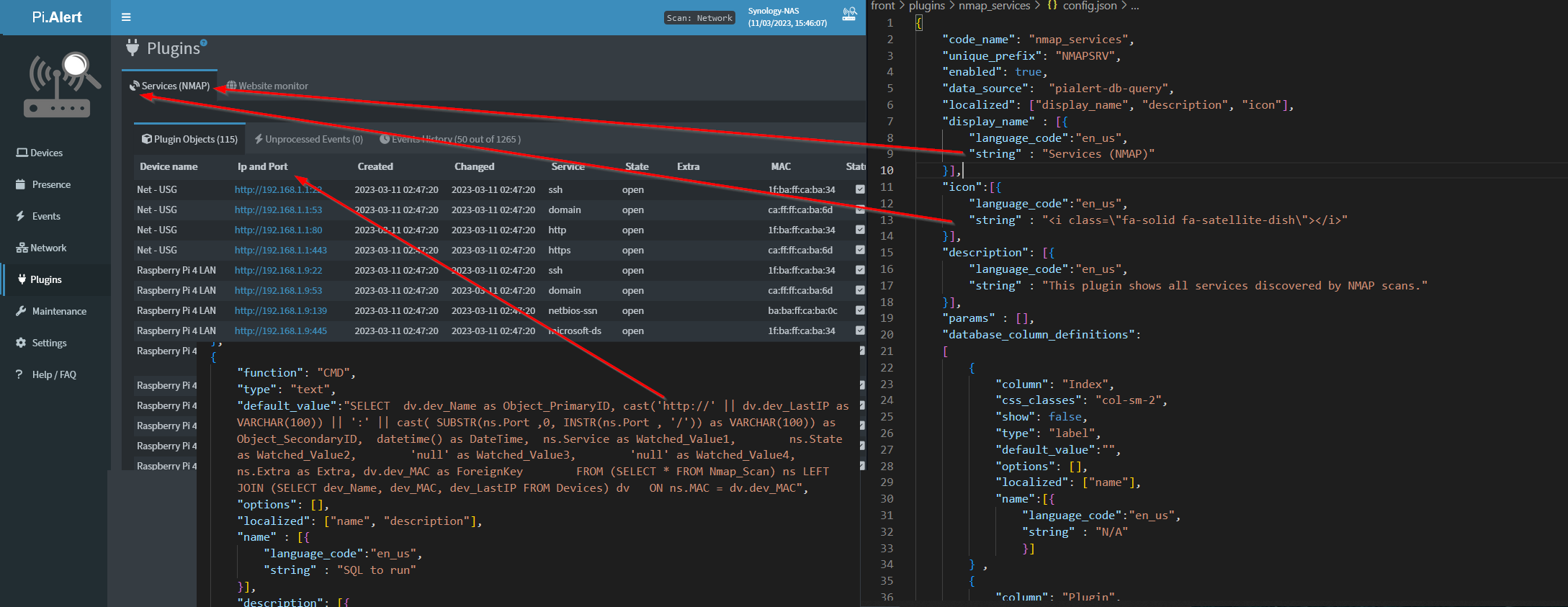
PiAlert verfügt über ein Plugin-System, um Ereignisse aus Skripten von Drittanbietern in die Benutzeroberfläche einzuspeisen und dann bei Bedarf Benachrichtigungen zu senden. Die hervorgehobene Kernfunktionalität, die dieses Plugin-System unterstützt, ist:
- dynamische Erstellung einer einfachen Benutzeroberfläche zur Interaktion mit den entdeckten Objekten,
- Filterung der angezeigten Werte in der Geräte-Benutzeroberfläche
- Oberflächeneinstellungen von Plugins in der Benutzeroberfläche,
- verschiedene Spaltentypen für gemeldete Werte, z.B. Link zurück zu einem Gerät
- Objekte in vorhandene PiAlert-Datenbanktabellen importieren
(Derzeit wird das Aktualisieren/Überschreiben vorhandener Objekte nicht unterstützt.)
Beispielanwendungsfälle für Plugins könnten sein:
- Überwachen Sie einen Webdienst und benachrichtigen Sie mich, wenn er nicht verfügbar ist
- Importieren Sie Geräte aus dhcp.leases-Dateien anstelle/ergänzend zur Verwendung von PiHole oder arp-scans
- Erstellen von Ad-hoc-UI-Tabellen aus vorhandenen Daten in der PiAlert-Datenbank, z.B. um alle offenen Ports auf Geräten anzuzeigen, um Geräte aufzulisten, die in der letzten Stunde getrennt wurden usw.
- Verwendung anderer Geräteerkennungsmethoden im Netzwerk und Importieren der Daten als neue Geräte
- Erstellen eines Skripts zum Erstellen gefälschter Geräte basierend auf Benutzereingaben über benutzerdefinierte Einstellungen
- ...an diesem Punkt liegt die Einschränkung hauptsächlich in der Kreativität und nicht in der Leistungsfähigkeit (es kann Randfälle geben und die Notwendigkeit, mehr Formularsteuerelemente für Benutzereingaben aus benutzerdefinierten Einstellungen zu unterstützen, aber Sie haben wahrscheinlich schon verstanden, worauf es ankommt)
Wenn Sie ein Plugin entwickeln möchten, prüfen Sie bitte die bestehende Plugin-Struktur. Sobald die Einstellungen vom Benutzer gespeichert wurden, müssen sie manuell aus der Datei pialert.conf entfernt werden, wenn Sie sie aus der config.json des Plugins neu initialisieren möchten.
Bitte lesen Sie das Folgende noch einmal sorgfältig durch, wenn Sie selbst mit einem Plugin beitragen möchten. Diese Dokumentationsdatei ist möglicherweise veraltet. Überprüfen Sie daher auch die Beispiel-Plugins noch einmal.
⚠ Haftungsausschluss
Befolgen Sie die nachstehenden Anweisungen sorgfältig und prüfen Sie Beispiel-Plugins, wenn Sie selbst eines schreiben möchten. Die Plugin-Benutzeroberfläche ist derzeit nicht meine Priorität. Gerne genehmige ich PRs, wenn Sie daran interessiert sind, die Benutzeroberfläche zu erweitern/verbessern (siehe Frontend-Richtlinien). Beispielhafte Verbesserungen zum Mitnehmen:
- Die Tabellen sortierbar/filterbar machen
- Verwenden des gleichen Ansatzes zum Anzeigen von Tabellendaten wie im Abschnitt "Geräte" (wird oben gelöst)
- Hinzufügen unterstützter Formularsteuerelemente zum Anzeigen der Daten (Derzeit unterstützte Steuerelemente sind im Abschnitt "UI-Einstellungen in Datenbankspaltendefinitionen" unten aufgeführt)
- ...
❗ Bekannte Probleme:
These issues will be hopefully fixed with time, so please don't report them. Instead, if you know how, feel free to investigate and submit a PR to fix the below. Keep the PRs small as it's easier to approve them:
- Vorhandene Plugin-Objekte werden manchmal nicht richtig interpretiert und stattdessen wird ein neues Objekt erstellt, was zu doppelten Einträgen führt. (Rennbedingung?)
- Gelegentliches (zweimal aufgetretenes) Hängenbleiben der Verarbeitungs-Plugin-Skriptdatei. Die Benutzeroberfläche zeigt veraltete Werte an, bis die API-Endpunkte aktualisiert werden.
Übersicht über die Plugin-Dateistruktur
⚠️Der Ordnername muss mit dem Codenamenwert in Folgendem übereinstimmen:
"code_name": "<value>"Das eindeutige Präfix muss im Vergleich zu den anderen Einstellungspräfixen eindeutig sein, z. B.: Das PräfixAPPRISEwird bereits verwendet.
| File | Required (plugin type) | Description |
|---|---|---|
config.json |
yes | Contains the plugin configuration (manifest) including the settings available to the user. |
script.py |
no | The Python script itself. You may call any valid linux command. |
last_result.log |
no | The file used to interface between PiAlert and the plugin. Required for a script plugin if you want to feed data into the app. |
script.log |
no | Logging output (recommended) |
README.md |
yes | Any setup considerations or overview |
Weitere Einzelheiten finden Sie weiter unten.
Spaltenreihenfolge und Werte
| Order | Represented Column | Required | Description |
|---|---|---|---|
| 0 | Object_PrimaryID |
yes | The primary ID used to group Events under. |
| 1 | Object_SecondaryID |
no | Optional secondary ID to create a relationship beween other entities, such as a MAC address |
| 2 | DateTime |
yes | When the event occured in the format 2023-01-02 15:56:30 |
| 3 | Watched_Value1 |
yes | A value that is watched and users can receive notifications if it changed compared to the previously saved entry. For beispiel IP address |
| 4 | Watched_Value2 |
no | As above |
| 5 | Watched_Value3 |
no | As above |
| 6 | Watched_Value4 |
no | As above |
| 7 | Extra |
no | Any other data you want to pass and display in PiAlert and the notifications |
| 8 | ForeignKey |
no | A foreign key that can be used to link to the parent object (usually a MAC address) |
Note
De-duplication is run once an hour on the
Plugins_Objectsdatabase table and duplicate entries with the same value in columnsObject_PrimaryID,Object_SecondaryID,Plugin(auto-filled based onunique_prefixof the plugin),UserData(can be populated with the"type": "textbox_save"column type) are removed.
config.json structure
Unterstützte Datenquellen
Currently, these data sources are supported (valid data_source value).
| Name | data_source value |
Needs to return a "table" | Overview (more details on this page below) |
|---|---|---|---|
| Script | script |
no | Executes any linux command in the CMD setting. |
| Pialert DB query | pialert-db-query |
yes | Executes a SQL query on the PiAlert database in the CMD setting. |
| Template | template |
no | Used to generate internal settings, such as default values. |
| External SQLite DB query | sqlite-db-query |
yes | Executes a SQL query from the CMD setting on an external SQLite database mapped in the DB_PATH setting. |
🔎Beispiel
"data_source": "pialert-db-query"
If you want to display plugin objects or import devices into the app, data sources have to return a "table" of the exact structure as outlined above.
You can show or hide the UI on the "Plugins" page and "Plugins" tab for a plugin on devices via the show_ui property:
🔎Beispiel
"show_ui": true,
"data_source": "script"
If the data_source is set to script the CMD setting (that you specify in the settings array section in the config.json) contains an executable Linux command, that usually generates a last_result.log file (not required if you don't import any data into the app). This file needs to be stored in the same folder as the plugin.
Important
A lot of the work is taken care of by the
plugin_helper.pylibrary. You don't need to manage thelast_result.logfile if using the helper objects. Check otherscript.pyof other plugins for details (The Undicoverables pluginsscript.pyfile is a good beispiel).
The content of the last_result.log file needs to contain the columns as defined in the "Column order and values" section above. The order of columns can't be changed. After every scan it should contain only the results from the latest scan/execution.
- The format of the
last_result.logis acsv-like file with the pipe|as a separator. - 9 (nine) values need to be supplied, so every line needs to contain 8 pipe separators. Empty values are represented by
null. - Don't render "headers" for these "columns". Every scan result/event entry needs to be on a new line.
- You can find which "columns" need to be present, and if the value is required or optional, in the "Column order and values" section.
- The order of these "columns" can't be changed.
🔎 last_result.log beispieles
Valid CSV:
https://www.google.com|null|2023-01-02 15:56:30|200|0.7898|null|null|null|null
https://www.duckduckgo.com|192.168.0.1|2023-01-02 15:56:30|200|0.9898|null|null|Best search engine|ff:ee:ff:11:ff:11
Invalid CSV with different errors on each line:
https://www.google.com|null|2023-01-02 15:56:30|200|0.7898||null|null|null
https://www.duckduckgo.com|null|2023-01-02 15:56:30|200|0.9898|null|null|Best search engine|
|https://www.duckduckgo.com|null|2023-01-02 15:56:30|200|0.9898|null|null|Best search engine|null
null|192.168.1.1|2023-01-02 15:56:30|200|0.9898|null|null|Best search engine
https://www.duckduckgo.com|192.168.1.1|2023-01-02 15:56:30|null|0.9898|null|null|Best search engine
https://www.google.com|null|2023-01-02 15:56:30|200|0.7898|||
https://www.google.com|null|2023-01-02 15:56:30|200|0.7898|
"data_source": "pialert-db-query"
If the data_source is set to pialert-db-query the CMD setting needs to contain a SQL query rendering the columns as defined in the "Column order and values" section above. The order of columns is important.
This SQL query is executed on the pialert.db SQLite database file.
🔎Beispiel
SQL query Beispiel:
SELECT  dv.dev_Name as Object_PrimaryID,
    cast(dv.dev_LastIP as VARCHAR(100)) || ':' || cast( SUBSTR(ns.Port ,0, INSTR(ns.Port , '/')) as VARCHAR(100)) as Object_SecondaryID,
    datetime() as DateTime,
    ns.Service as Watched_Value1,
    ns.State as Watched_Value2,
    'null' as Watched_Value3,
    'null' as Watched_Value4,
    ns.Extra as Extra,
    dv.dev_MAC as ForeignKey
FROM
    (SELECT * FROM Nmap_Scan) ns
LEFT JOIN
    (SELECT dev_Name, dev_MAC, dev_LastIP FROM Devices) dv
ON ns.MAC = dv.dev_MAC
Required
CMDsetting beispiel with above query (you can set"type": "label"if you want it to make uneditable in the UI):{ "function": "CMD", "type": "text", "default_value":"SELECT dv.dev_Name as Object_PrimaryID, cast(dv.dev_LastIP as VARCHAR(100)) || ':' || cast( SUBSTR(ns.Port ,0, INSTR(ns.Port , '/')) as VARCHAR(100)) as Object_SecondaryID, datetime() as DateTime, ns.Service as Watched_Value1, ns.State as Watched_Value2, 'null' as Watched_Value3, 'null' as Watched_Value4, ns.Extra as Extra FROM (SELECT * FROM Nmap_Scan) ns LEFT JOIN (SELECT dev_Name, dev_MAC, dev_LastIP FROM Devices) dv ON ns.MAC = dv.dev_MAC", "options": [], "localized": ["name", "description"], "name" : [{ "language_code":"en_us", "string" : "SQL to run" }], "description": [{ "language_code":"en_us", "string" : "This SQL query is used to populate the coresponding UI tables under the Plugins section." }] }
"data_source": "template"
Used to initialize internal settings. Check the newdev_template plugin for details.
"data_source": "sqlite-db-query"
You can execute a SQL query on an external database connected to the current PiALert database via a temporary EXTERNAL_<unique prefix>. prefix. For beispiel for PIHOLE ("unique_prefix": "PIHOLE") it is EXTERNAL_PIHOLE.. The external SQLite database file has to be mapped in the container to the path specified in the DB_PATH setting:
🔎Beispiel
 ...
{
       "function": "DB_PATH",
       "type": "readonly",
       "default_value":"/etc/pihole/pihole-FTL.db",
       "options": [],
       "localized": ["name", "description"],
       "name" : [{
           "language_code":"en_us",
           "string" : "DB Path"
       }],
       "description": [{
           "language_code":"en_us",
           "string" : "Required setting for the <code>sqlite-db-query</code> plugin type. Is used to mount an external SQLite database and execute the SQL query stored in the <code>CMD</code> setting."
       }]
   }
 ...
The actual SQL query you want to execute is then stored as a CMD setting, similar to the pialert-db-query plugin type The format has to adhere to the format outlined in the "Column order and values" section above.
🔎Beispiel
Notice the
EXTERNAL_PIHOLE.prefix.{ "function": "CMD", "type": "text", "default_value":"SELECT hwaddr as Object_PrimaryID, cast('http://' || (SELECT ip FROM EXTERNAL_PIHOLE.network_addresses WHERE network_id = id ORDER BY lastseen DESC, ip LIMIT 1) as VARCHAR(100)) || ':' || cast( SUBSTR((SELECT name FROM EXTERNAL_PIHOLE.network_addresses WHERE network_id = id ORDER BY lastseen DESC, ip LIMIT 1), 0, INSTR((SELECT name FROM EXTERNAL_PIHOLE.network_addresses WHERE network_id = id ORDER BY lastseen DESC, ip LIMIT 1), '/')) as VARCHAR(100)) as Object_SecondaryID, datetime() as DateTime, macVendor as Watched_Value1, lastQuery as Watched_Value2, (SELECT name FROM EXTERNAL_PIHOLE.network_addresses WHERE network_id = id ORDER BY lastseen DESC, ip LIMIT 1) as Watched_Value3, 'null' as Watched_Value4, '' as Extra, hwaddr as ForeignKey FROM EXTERNAL_PIHOLE.network WHERE hwaddr NOT LIKE 'ip-%' AND hwaddr <> '00:00:00:00:00:00'; ", "options": [], "localized": ["name", "description"], "name" : [{ "language_code":"en_us", "string" : "SQL to run" }], "description": [{ "language_code":"en_us", "string" : "This SQL query is used to populate the coresponding UI tables under the Plugins section. This particular one selects data from a mapped PiHole SQLite database and maps it to the corresponding Plugin columns." }] }
🕳 Filter
Plugin-Einträge können in der Benutzeroberfläche basierend auf in Filterfeldern eingegebenen Werten gefiltert werden. Das Textfeld/Feld txtMacFilter enthält die Mac-Adresse des aktuell angezeigten Geräts oder einfach eine Mac-Adresse, die in der Abfragezeichenfolge mac verfügbar ist.
| Property | Required | Description |
|---|---|---|
compare_column |
yes | Plugin column name that's value is used for comparison (Left side of the equation) |
compare_operator |
yes | JavaScript comparison operator |
compare_field_id |
yes | The id of a input text field containing a value is used for comparison (Right side of the equation) |
compare_js_template |
yes | JavaScript code used to convert left and right side of the equation. {value} is replaced with input values. |
compare_use_quotes |
yes | If true then the end result of the compare_js_template i swrapped in " quotes. Use to compare strings. |
Filters are only applied if a filter is specified and the txtMacFilter is not undefined or empty (--).
🔎Beispiel:
    "data_filters": [
        {
            "compare_column" : "Object_PrimaryID",
            "compare_operator" : "==",
            "compare_field_id": "txtMacFilter",
            "compare_js_template": "'{value}'.toString()",
            "compare_use_quotes": true
        }
    ],
- On the
pluginsCore.phppage is an input field with thetxtMacFilterid:<input class="form-control" id="txtMacFilter" type="text" value="--">
This input field is initialized via the
&mac=query string.The app then proceeds to use this Mac value from this field and compares it to the value of the
Object_PrimaryIDdatabase field. Thecompare_operatoris==.Both values, from the database field
Object_PrimaryIDand from thetxtMacFilterare wrapped and evaluated with thecompare_js_template, that is'{value}.toString()'.
compare_use_quotesis set totrueso'{value}'.toString()is wrappe dinto"quotes.Daraus ergibt sich beispielsweise dieser code:
   // left part of teh expression coming from compare_column and right from the input field
   // notice the added quotes ()") around the left and right part of teh expression
   "eval('ac:82:ac:82:ac:82".toString()')" == "eval('ac:82:ac:82:ac:82".toString()')"
🗺 Zuordnung der Plugin-Ergebnisse zu einer Datenbanktabelle
Plugin results are always inserted into the standard Plugin_Objects database table. Optionally, PiAlert can take the results of the plugin execution and insert these results into an additional database table. This is enabled by with the property "mapped_to_table" in the config.json file. The mapping of the columns is defined in the database_column_definitions array.
Note
If results are mapped to the
CurrentScantable, the data is then included into the regular scan loop, so for beispiel notification for devices are sent out.
🔍 Beispiel:
For beispiel, this approach is used to implement the
DHCPLSSplugin. The script parses all supplied "dhcp.leases" files, gets the results in the generic table format outlined in the "Column order and values" section above and takes individual values and inserts them into theCurrentScandatabase table in the PiAlert database. All this is achieved by:
- Specifying the database table into which the results are inserted by defining
"mapped_to_table": "CurrentScan"in the root of theconfig.jsonfile as shown below:{ "code_name": "dhcp_leases", "unique_prefix": "DHCPLSS", ... "data_source": "script", "localized": ["display_name", "description", "icon"], "mapped_to_table": "CurrentScan", ... }
- Defining the target column with the
mapped_to_columnproperty for individual columns in thedatabase_column_definitionsarray of theconfig.jsonfile. For beispiel in theDHCPLSSplugin, I needed to map the value of theObject_PrimaryIDcolumn returned by the plugin, to thecur_MACcolumn in the PiAlert databaseCurrentScantable. Notice the"mapped_to_column": "cur_MAC"key-value pair in the sample below.{ "column": "Object_PrimaryID", "mapped_to_column": "cur_MAC", "css_classes": "col-sm-2", "show": true, "type": "device_mac", "default_value":"", "options": [], "localized": ["name"], "name":[{ "language_code":"en_us", "string" : "MAC address" }] }
- That's it. PiAlert takes care of the rest. It loops thru the objects discovered by the plugin, takes the results line, by line and inserts them into the database table specified in
"mapped_to_table". The columns are translated from the generic plugin columns to the target table via the"mapped_to_column"property in the column definitions.
Note
You can create a column mapping with a default value via the
mapped_to_column_dataproperty. This means that the value of the given column will always be this value. Taht also menas that the"column": "NameDoesntMatter"is not important as there is no databse source column.
🔍 Beispiel:
{
           "column": "NameDoesntMatter",
           "mapped_to_column": "cur_ScanMethod",
           "mapped_to_column_data": {
               "value": "DHCPLSS"
           },
           "css_classes": "col-sm-2",
           "show": true,
           "type": "device_mac",
           "default_value":"",
           "options": [],
           "localized": ["name"],
           "name":[{
               "language_code":"en_us",
               "string" : "MAC address"
               }]
       }
params
The params array in the config.json is used to enable the user to change the parameters of the executed script. For beispiel, the user wants to monitor a specific URL.
🔎 Beispiel: Passing user-defined settings to a command. Let's say, you want to have a script, that is called with a user-defined parameter called
urls:root@server# python3 /home/pi/pialert/front/plugins/website_monitor/script.py urls=https://google.com,https://duck.com
- You can allow the user to add URLs to a setting with the
functionproperty set to a custom name, such asurls_to_check(this is not a reserved name from the section "Supported settingsfunctionvalues" below). - You specify the parameter
urlsin theparamssection of theconfig.jsonthe following way (WEBMON_is the plugin prefix automatically added to all the settings):
{
    "params" : [
        {
            "name"  : "urls",
            "type"  : "setting",
            "value" : "WEBMON_urls_to_check"
        }]
}
- Then you use this setting as an input parameter for your command in the
CMDsetting. Noticeurls={urls}in the below json:
 {
            "function": "CMD",
            "type": "text",
            "default_value":"python3 /home/pi/pialert/front/plugins/website_monitor/script.py urls={urls}",
            "options": [],
            "localized": ["name", "description"],
            "name" : [{
                "language_code":"en_us",
                "string" : "Command"
            }],
            "description": [{
                "language_code":"en_us",
                "string" : "Command to run"
            }]
        }
During script execution, the app will take the command "python3 /home/pi/pialert/front/plugins/website_monitor/script.py urls={urls}", take the {urls} wildcard and replace it with the value from the WEBMON_urls_to_check setting. This is because:
- The app checks the
paramsentries - It finds
"name" : "urls" - Checks the type of the
urlsparams and finds"type" : "setting" - Gets the setting name from
"value" : "WEBMON_urls_to_check"- IMPORTANT: in the
config.jsonthis setting is identified by"function":"urls_to_check", not"function":"WEBMON_urls_to_check" - You can also use a global setting, or a setting from a different plugin
- IMPORTANT: in the
- The app gets the user defined value from the setting with the code name
WEBMON_urls_to_check- let's say the setting with the code name
WEBMON_urls_to_checkcontains 2 values entered by the user: WEBMON_urls_to_check=['https://google.com','https://duck.com']
- let's say the setting with the code name
- The app takes the value from
WEBMON_urls_to_checkand replaces the{urls}wildcard in the setting where"function":"CMD", so you go from:python3 /home/pi/pialert/front/plugins/website_monitor/script.py urls={urls}- to
python3 /home/pi/pialert/front/plugins/website_monitor/script.py urls=https://google.com,https://duck.com
Below are some general additional notes, when defining params:
"name":"name_value"- is used as a wildcard replacement in theCMDsetting value by using curly brackets{name_value}. The wildcard is replaced by the result of the"value" : "param_value"and"type":"type_value"combo configuration below."type":"<sql|setting>"- is used to specify the type of the params, currently only 2 supported (sql,setting)."type":"sql"- will execute the SQL query specified in thevalueproperty. The sql query needs to return only one column. The column is flattened and separated by commas (,), e.g:SELECT dev_MAC from DEVICES->Internet,74:ac:74:ac:74:ac,44:44:74:ac:74:ac. This is then used to replace the wildcards in theCMDsetting."type":"setting"- The setting code name. A combination of the value fromunique_prefix+_+functionvalue, or otherwise the code name you can find in the Settings page under the Setting display name, e.g.PIHOLE_RUN.
"value": "param_value"- Needs to contain a setting code name or SQL query without wildcards."timeoutMultiplier" : true- used to indicate if the value should multiply the max timeout for the whole script run by the number of values in the given parameter."base64": true- use base64 encoding to pass the value to the script (e.g. if there are spaces)
🔎Beispiel:
{
    "params" : [{
           "name"              : "ips",
           "type"              : "sql",
           "value"             : "SELECT dev_LastIP from DEVICES",
           "timeoutMultiplier" : true
       },
       {
           "name"              : "macs",
           "type"              : "sql",
           "value"             : "SELECT dev_MAC from DEVICES"
       },
       {
           "name"              : "timeout",
           "type"              : "setting",
           "value"             : "NMAP_RUN_TIMEOUT"
       },
       {
           "name"              : "args",
           "type"              : "setting",
           "value"             : "NMAP_ARGS",
           "base64"            : true
       }]
}
⚙ Objektstruktur festlegen
Note
Der Einstellungsablauf und wann Plugin-spezifische Einstellungen angewendet werden, wird im Einstellungssystem beschrieben.
Required attributes are:
| Property | Description |
|---|---|
"function" |
Specifies the function the setting drives or a simple unique code name. See Supported settings function values for options. |
"type" |
Specifies the form control used for the setting displayed in the Settings page and what values are accepted. Supported options include: |
- text |
|
- integer |
|
- boolean |
|
- password |
|
- readonly |
|
- integer.select |
|
- text.select |
|
- text.multiselect |
|
- list |
|
- integer.checkbox |
|
- text.template |
|
"localized" |
A list of properties on the current JSON level that need to be localized. |
"name" |
Displayed on the Settings page. An array of localized strings. See Localized strings below. |
"description" |
Displayed on the Settings page. An array of localized strings. See Localized strings below. |
(optional) "events" |
Specifies whether to generate an execution button next to the input field of the setting. Supported values: |
- test |
|
- run |
|
(optional) "override_value" |
Used to determine a user-defined override for the setting. Useful for template-based plugins, where you can choose to leave the current value or override it with the value defined in the setting. (Work in progress) |
(optional) "events" |
Used to trigger the plugin. Usually used on the RUN setting. Not fully tested in all scenarios. Will show a play button next to the setting. After clicking, an event is generated for the backend in the Parameters database table to process the front-end event on the next run. |
Unterstützte Einstellungen function werte
You can have any "function": "my_custom_name" custom name, however, the ones listed below have a specific functionality attached to them. If you use a custom name, then the setting is mostly used as an input parameter for the params section.
| Setting | Description |
|---|---|
RUN |
(required) Specifies when the service is executed. |
| Supported Options: | |
| - "disabled" - not run | |
| - "once" - run on app start or on settings saved | |
- "schedule" - if included, then a RUN_SCHD setting needs to be specified to determine the schedule |
|
| - "always_after_scan" - run always after a scan is finished | |
| - "on_new_device" - run when a new device is detected | |
- "before_config_save" - run before the config is marked as saved. Useful if your plugin needs to modify the pialert.conf file. |
|
RUN_SCHD |
(required if you include the above RUN function) Cron-like scheduling is used if the RUN setting is set to schedule. |
CMD |
(required) Specifies the command that should be executed. |
API_SQL |
(optional) Generates a table_ + code_name + .json file as per API docs. |
RUN_TIMEOUT |
(optional) Specifies the maximum execution time of the script. If not specified, a default value of 10 seconds is used to prevent hanging. |
WATCH |
(optional) Specifies which database columns are watched for changes for this particular plugin. If not specified, no notifications are sent. |
REPORT_ON |
(optional) Specifies when to send a notification. Supported options are: |
- new means a new unique (unique combination of PrimaryId and SecondaryId) object was discovered. |
|
- watched-changed - means that selected Watched_ValueN columns changed |
|
- watched-not-changed - reports even on events where selected Watched_ValueN did not change |
|
- missing-in-last-scan - if the object is missing compared to previous scans |
🔎 Beispiel:
{
    "function": "RUN",
    "type": "text.select",
    "default_value":"disabled",
    "options": ["disabled", "once", "schedule", "always_after_scan", "on_new_device"],
    "localized": ["name", "description"],
    "name" :[{
        "language_code":"en_us",
        "string" : "When to run"
    }],
    "description": [{
        "language_code":"en_us",
        "string" : "Enable a regular scan of your services. If you select <code>schedule</code> the scheduling settings from below are applied. If you select <code>once</code> the scan is run only once on start of the application (container) for the time specified in <a href=\"#WEBMON_RUN_TIMEOUT\"><code>WEBMON_RUN_TIMEOUT</code> setting</a>."
    }]
}
🌍Lokalisierte Zeichenfolgen
"language_code":"<en_us|es_es|de_de>"- code name of the language string. Only these three are currently supported. At least the"language_code":"en_us"variant has to be defined."string"- The string to be displayed in the given language.
🔎 Beispiel:
    {
        "language_code":"en_us",
        "string" : "When to run"
    }
UI-Einstellungen in database_column_definitions.
The UI will adjust how columns are displayed in the UI based on the resolvers definition of the database_column_definitions object. These are the supported form controls and related functionality:
- Only columns with
"show": trueand also with at least an English translation will be shown in the UI.
| Supported Types | Description |
|---|---|
label |
Displays a column only. |
text |
Makes a column editable, and a save icon is displayed next to it. See below for information on threshold, replace. |
options Property |
Used in conjunction with types like threshold, replace, regex. |
threshold |
The options array contains objects ordered from the lowest maximum to the highest. The corresponding hexColor is used for the value background color if it's less than the specified maximum but more than the previous one in the options array. |
replace |
The options array contains objects with an equals property, which is compared to the "value." If the values are the same, the string in replacement is displayed in the UI instead of the actual "value". |
regex |
Applies a regex to the value. The options array contains objects with an type (must be set to regex) and param (must contain the regex itself) property. |
| Type Definitions | |
device_mac |
The value is considered to be a MAC address, and a link pointing to the device with the given MAC address is generated. |
device_ip |
The value is considered to be an IP address. A link pointing to the device with the given IP is generated. The IP is checked against the last detected IP address and translated into a MAC address, which is then used for the link itself. |
device_name_mac |
The value is considered to be a MAC address, and a link pointing to the device with the given IP is generated. The link label is resolved as the target device name. |
url |
The value is considered to be a URL, so a link is generated. |
textbox_save |
Generates an editable and saveable text box that saves values in the database. Primarily intended for the UserData database column in the Plugins_Objects table. |
url_http_https |
Generates two links with the https and http prefix as lock icons. |
Note
Unterstützt Verkettung. Sie können mehrere Resolver mit „.“ verketten. Zum Beispiel
regex.url_http_https. Dadurch wird der Resolverregexund dann der Resolverurl_http_httpsangewendet.
{
            "column": "Watched_Value1",
            "css_classes": "col-sm-2",
            "show": true,
            "type": "threshold",
            "default_value":"",
            "options": [
                {
                    "maximum": 199,
                    "hexColor": "#792D86"
                },
                {
                    "maximum": 299,
                    "hexColor": "#5B862D"
                },
                {
                    "maximum": 399,
                    "hexColor": "#7D862D"
                },
                {
                    "maximum": 499,
                    "hexColor": "#BF6440"
                },
                {
                    "maximum": 599,
                    "hexColor": "#D33115"
                }
            ],
            "localized": ["name"],
            "name":[{
                "language_code":"en_us",
                "string" : "Status code"
                }]
        },
        {
            "column": "Status",
            "show": true,
            "type": "replace",
            "default_value":"",
            "options": [
                {
                    "equals": "watched-not-changed",
                    "replacement": "<i class='fa-solid fa-square-check'></i>"
                },
                {
                    "equals": "watched-changed",
                    "replacement": "<i class='fa-solid fa-triangle-exclamation'></i>"
                },
                {
                    "equals": "new",
                    "replacement": "<i class='fa-solid fa-circle-plus'></i>"
                }
            ],
            "localized": ["name"],
            "name":[{
                "language_code":"en_us",
                "string" : "Status"
                }]
        },
        {
            "column": "Watched_Value3",
            "css_classes": "col-sm-1",
            "show": true,
            "type": "regex.url_http_https",
            "default_value":"",
            "options": [
                {
                    "type": "regex",
                    "param": "([\\d.:]+)"
                }
            ],
            "localized": ["name"],
            "name":[{
                "language_code":"en_us",
                "string" : "HTTP/s links"
                },
	    	    {
                "language_code":"es_es",
                "string" : "N/A"
                }]
        }