mirror of
https://github.com/jokob-sk/NetAlertX.git
synced 2026-04-15 22:51:37 -07:00
 sebingel
4c117db463
sebingel
4c117db463
The key 'ordeable' in elementOptions was a long-standing typo for the
correct English word 'orderable'. Since the JS check in settings_utils.js
used the same misspelled key, the feature appeared to work — but it was
relying on the consistent propagation of a typo across the entire codebase.

Two pre-existing entries in front/plugins/ui_settings/config.json already
used the correct spelling 'orderable', but these had no effect because the
JavaScript check (option.ordeable === 'true') never matched them. As a
result, orderable behavior was silently disabled for those two settings.

Changes:
- front/js/settings_utils.js: renamed option.ordeable → option.orderable
  and isOrdeable → isOrderable (6 occurrences, lines 792/823/824/880/1079/
  1192/1228). The JS key check is the authoritative definition of the
  elementOptions property name, so this must change atomically with all
  config files.

- server/initialise.py:245: renamed "ordeable" → "orderable" in the
  hardcoded JSON string for LOADED_PLUGINS setting. This string is the
  source-of-truth for that setting's elementOptions and is not auto-
  generated from the plugin config files.

- front/plugins/*/config.json (33 files, 90 occurrences): renamed all
  "ordeable": "true" entries to "orderable": "true" via sed. All plugins
  used the typo consistently; they must be updated in the same commit to
  avoid a broken intermediate state.

The two formerly broken 'orderable' entries in ui_settings/config.json
are now matched by the corrected JS check and work as intended.

Fixes netalertx/NetAlertX#1584

Co-Authored-By: Claude Opus 4.6 <noreply@anthropic.com>
Overview
Warning
UNMAINTAINED - Looking for maintainers. If possible, use the
OMDSDNOPENAPIinstead.
The OMADA SDN plugin aims at synchronizing data between NetAlertX and a TPLINK OMADA SND controler by leveraging a tplink omada python library.
Features
- extract list of OMADA Clients from OMADA and sync them up with NetAlertX
- extract list of OAMDA Devices (switches and access points) and sync them up with NetAlertX
Tip
Some omada devices are apparently not fully compatible with the API which might lead to partial results.
Quick setup guide
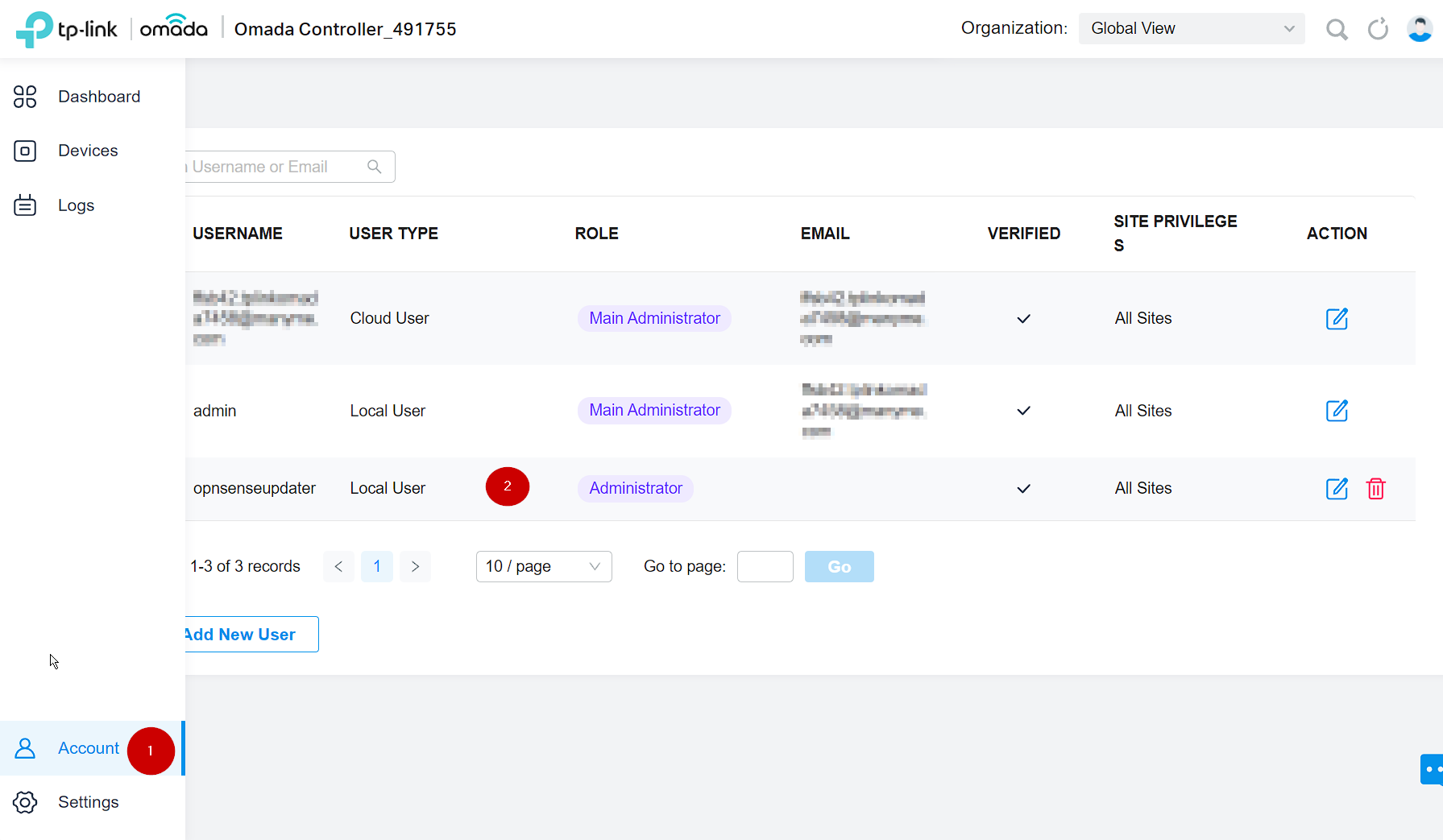
- You SHOULD (ie: strongly recommend) set up an account in your OMADA SDN console dedicated to NetAlertX OMADA_SDN plugin.
- you should set USER TYPE = Local User
- you should set USER ROLE = Administrator (if you use a read-only role you won't be able to sync names from NetAlerX to OMADA SDN)
- you can set Site Privileges = All Sites (or limit it to specific sites )
- populate the variables in NetAlertX as instructed in the config plugin page.
Required Settings
OMDSDN_urlOMDSDN_sitesOMDSDN_usernameOMDSDN_password(if using special characters, make sure they are python-friendly (e.g.~))OMDSDN_force_overwrite
Usage
- Head to Settings > Plugin name to adjust the default values.
Notes
features not implemented yet:
- Extract list of OAMDA router Devices (er605...) and sync them up with NetAlertX (I need to setup my own er605 however due to its limitations I have no use for it, and due to limitations of opensense dhcp servers, I can't deploy it yet without breaking dhcp self registration into opnsense unbound - see below)
know limitations:
OMADA SDN limitation fixed by the plugin: 0. OMADA SDN can't use DNS for names and keep using MAC ref: https://community.tp-link.com/en/business/forum/topic/503782
- when you use an OMADA user Role = Administrator, the plugin will attempt to fix OMADA's shortcoming and populat the NAME field from NetAlertX (from DNS/DHCP/...)

can not fix some of tplinks OMADA SDN own limitations/bugs:
- OMADA SDN switches uplinks/downlinks is broken if the default router is not an OMADA native device
- (I try to circumvent that through a tree parsing heuristic but your mileage might vary...)
- ref: https://community.tp-link.com/en/business/forum/topic/673628
- OMADA SDN clients are sometimes mapped to the wrong switch/port... for instance:
- client -> access_switch1/port1 -> core_switch2/port2 sometimes shows as client -> core_switch2/port2
- it is unclear if this issue is realted to (1)
- OMADA er605 routers do not self register DHCP names with a remote unbound DNS (nor embded DNS):
- ref: https://community.tp-link.com/en/business/forum/topic/542472
- it looks like some release candidate firmware might provide this feature... I will test when opnsesne Kea self registration get fixed as well(4)and I can get it dhcp proxy to work.
- Opnsense dhcp doesn't support relay and self-registration at the same time...
- opnsense legacy ISC dhcp server doesn't support dhcp proxies: ref: https://forum.opnsense.org/index.php?topic=34254.0
- opnsense new kea dhcp server doesn't support dns self registration (yet) ref: https://github.com/opnsense/core/pull/7362
- incompatible devices:
- OMADA EAP245 - to be fair to tp-link, this access point works inside OMADA SDN, so it might be an issue with our omada python library but we can't extract data from it.
Other info
- Version: 1.0
- Author : Flying Toto + Leicas
- Release Date: 04-Jul-2024